NNA Audio AnalyzerSee what your plugins and hardware really do
Free audio analysis for macOS.
Free. No account. No limits.
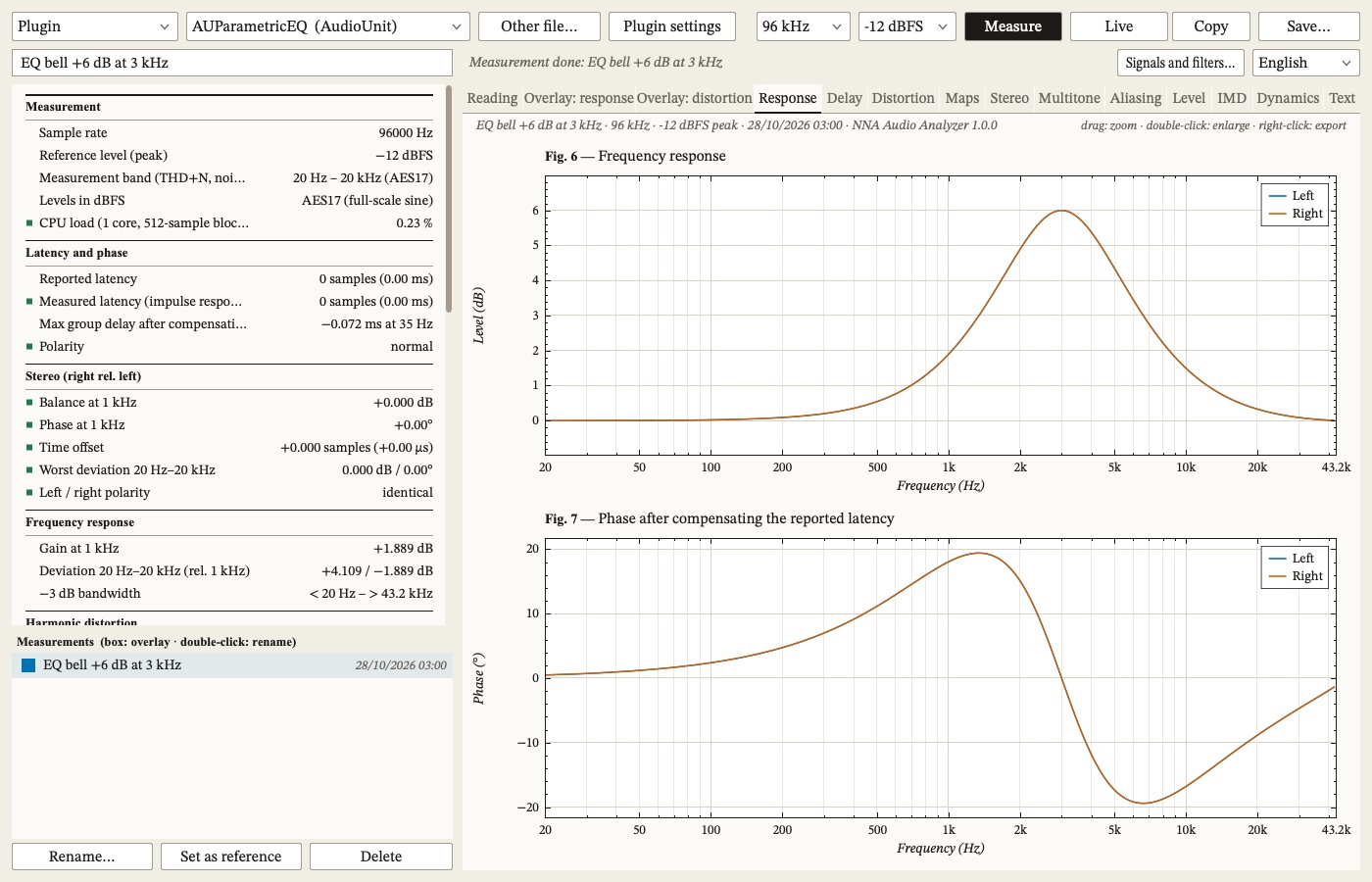
Controls
Plugin mode
 1
2
3
4
5
6
7
8
9
10
11
12
13
1
2
3
4
5
6
7
8
9
10
11
12
13
Hardware mode
 14
15
16
17
14
15
16
17
- Source: a plugin, or hardware (an outboard chain looped through your audio interface).
- Plugin list: every VST3 and Audio Unit installed on the Mac, with its format.
- Other file…: a .vst3 or .component from anywhere on disk.
- Plugin settings: opens the plugin’s own window. The measurement uses the settings you make there.
- Sample rate: 44.1 to 192 kHz for a plugin, kept from one session to the next.
- Level: the peak level of the test signals, −18 to 0 dBFS.
- Measure: the whole battery, from the sweep to the stepped sine, the noise and the intermodulation.
- Live: endless signals, or a track of your choice, with the curves redrawn as you turn the knobs.
- Copy: the reading as text, ready to paste.
- Save…: a PDF report with every numbered figure.
- Measurement name: what the measurement is called in the library (“SSL compressor”).
- Signals and filters…: your two tones and band multitone, the measurement band, the stepped sine through an interface.
- Language: English, French, Chinese or Japanese.
- Interface and channels…: the audio interface, the outputs that feed the chain and the inputs it comes back on.
- Precision: one pass, or four or sixteen averaged, to lower the noise on the response and the harmonics.
- dBu calibration…: the chain’s real gain, noise and clipping point in dBu, with a voltmeter if you have one.
- Loop…: the interface measured alone, outputs cabled to inputs, so it can be taken out of every measurement.

Measure what a plugin really does
Run a measurement, or test it live. VST3 and Audio Unit plugins, rendered offline in a fresh instance.
- Synchronised log sweep: frequency and phase response, group delay, impulse response
- Harmonics H2…H10 against frequency, from the sweep and from a stepped sine (one steady tone per third octave), THD and THD+N
- Aliasing, stereo balance, polarity and crosstalk, reported and measured latency
- Dynamics: compression detection, clipping level
- The Reading tab says in plain words what stands out: which harmonics dominate, audible aliasing, compression with its attack and release
- 44.1 to 192 kHz

Measure outboard, through your interface
Loop your interface once: the app subtracts the interface itself, so you measure only your gear. Levels in dBu once calibrated.
- Loop: cable the interface to itself and measure it once. Its response, phase, gain, left/right offset, polarity and latency are then removed from every measurement made with it; its distortion and noise are shown as the floor under each value.
- dBu calibration: the real gain of the chain, its noise and its clipping point in dBu, with a voltmeter assistant.
- Fast, Precise ×4 or Very precise ×16: passes averaged for the response, harmonics and IMD
- Every hardware measurement asks for confirmation first, and the signal fades in and out
- A warning when output and input sit on two devices whose clocks drift apart, or when the interface drops audio during a measurement

Measure in one click
Every test, one report: response, distortion, intermodulation, noise and aliasing, read in plain words next to the numbers. Offline for a plugin, through your interface for outboard gear.

Or measure live: the curves follow the knob
The curves follow the knob.
- Dense multitone, single tone, SMPTE, CCIF, or the two tones with each product coloured by order
- Freeze the curve keeps the response in grey to compare
- With hardware, the interface loop is taken out live too
- Cursors A and B follow the curves

Measure distortion across frequency and level
THD across frequency and level, and the spectrogram of the sweep, aliasing included.
- Sweep spectrogram: the fundamental on the diagonal, the harmonics above it, aliasing folding back down from Nyquist
- Distortion map: THD against frequency and input level, with the line where it reaches 1 %
- −48 to +6 dBFS for a plugin, −36 to 0 dBFS for hardware

Measure intermodulation (IMD)
SMPTE, CCIF, two tones and band multitone.
- SMPTE (60 Hz + 7 kHz, 4:1) and CCIF (19 + 20 kHz), fixed, to compare with published figures
- Two tones of equal level around a centre frequency you choose, with the spacing you want; products sorted by order, d2 and d3
- Band multitone: a centre, 1 to 24 tones per octave, 1 to 10 octaves wide. The tones are placed so that no second- or third-order product lands on another tone: what appears between them is the intermodulation in the band.

Measure noise and multitone, to the standards
Hiss and hum, as spec sheets state them, with the weightings published specs use: AES17, A, C, ITU-R 468, CCIR-ARM.
- Levels in dBFS to AES17 (0 dBFS = a full-scale sine)
- THD+N and noise over 20 Hz–20 kHz (AES17), 22 Hz–22 kHz or the full band
- Unweighted, A and C (IEC 61672), ITU-R 468-4 with a true quasi-peak detector and in RMS, CCIR-ARM
- Dynamic range to AES17, signal-to-noise ratio, hum at 50/60 Hz and its harmonics
- Multitone split into discrete lines and noise, and A-weighted

Measure on your own music
The plugin’s real curve, measured on your own track. Then listen to what it adds that an EQ would not: distortion, noise, pumping.
- Response and phase of the chain on the music, greyed where the coherence is low
- Residual: what the input does not explain. Distortion, noise, pumping: a null test on your track.
- Gain over time, and output against input level: the curve of a compressor
- Listen to the residual: the output minus what a linear filter predicts from the input, 0 to 40 dB of gain, under a soft limiter

Compare
Overlay several plugins, or A/B against a reference.
- Overlay: response, phase, left/right balance, THD against frequency and level, and noise of several plugins or units on the same figures
- A/B against a reference: every figure as before → after with the difference, and the response and phase differences drawn

Export PDF
A full A4 report with every numbered figure; PNG, SVG and CSV for each graph.
- Cursors A and B with Δf in Hz, ratio and octaves, and Δ level
- Double-click a figure to fill the tab; right-click for PNG (3× the screen), SVG or the data in CSV
- Save writes a full A4 PDF report: cover, reading, table, then every figure
NNA Audio Analyzer compared with PluginDoctor and REW
Swipe the table sideways to compare. The capability and NNA Audio Analyzer columns stay in place.
| Capability | PluginDoctorDDMF | REWRoom EQ Wizard | NNA Audio Analyzer |
|---|---|---|---|
| Price | paid; demo limited to one plugin per session | free (Pro upgrade for multi-input) | free |
| Platforms | macOS, Windows | macOS, Windows, Linux | macOS |
| Measures VST3 and AU plugins | ✓ | ✗ | ✓ |
| Runs inside your DAW as a plugin | ✓ VST, VST3, AU, AAX | ✗ | ✗ standalone app |
| Chains of several plugins, difference between two chains | ✓ two chains of up to 6 | ✗ | ✗ one plugin at a time |
| Outboard gear through your interface | hardware module, full version only | ✓ | ✓ interface loop taken out, levels in dBu |
| Room acoustics, speakers, SPL meter, impedance | not listed | ✓ its core | ✗ |
| Frequency and phase response | ✓ | ✓ | ✓ |
| Distortion against frequency | ✓ sweep | ✓ sweep and stepped sine | ✓ sweep and stepped sine, noise taken out |
| Distortion map across frequency and level | not listed | ✗ | ✓ |
| THD read against the noise around each harmonic; order-weighted THD | not listed | ✗ | ✓ |
| Aliasing | not listed | ✗ | ✓ |
| Dynamics: compression curve, attack and release | ✓ | ✗ | ✓ |
| CPU load | ✓ against buffer size | ✗ | at one buffer size |
| Intermodulation | an IMD mode | ✓ SMPTE, CCIF, two tones, multitone | ✓ SMPTE, CCIF, two tones, band multitone |
| Noise to standards: AES17, ITU-R 468, CCIR-ARM | not listed | A, C, Z on the SPL meter | ✓ |
| Live: curves follow every knob | real-time oscilloscope | real-time analyser | ✓ |
| Measurement on your own music, with coherence | not listed | ✓ | ✓ |
| Listen to the residual on headphones | not listed | ✗ | ✓ |
| Compare measurements | ✓ stored curves | measurement arithmetic | ✓ library, overlay, automatic A/B |
| Output and input on two clocks | not listed | ✓ detected and corrected | detected and reported |
| Export | screenshots | exports | PDF report, PNG, SVG, CSV |
Features from each maker's own page, October 2026: ddmf.eu/plugindoctor and roomeqwizard.com. "Not listed" means the feature is not on that page, not that it is proven absent. PluginDoctor is by DDMF and REW by John Mulcahy; neither is affiliated with Neutral & Natural Audio.
Measuring a room or a loudspeaker? Use REW. Measuring a plugin, a compressor or a converter? That is what NNA Audio Analyzer is for.
Test signals
- Synchronised log sine sweep
- Multitone and band multitone
- Single tones and level steps
- SMPTE, CCIF and user-defined two tones
- Silence and burst
- Your own music
Standards
- Levels in dBFS to AES17
- Measurement band 20 Hz–20 kHz AES17, 22 Hz–22 kHz or full band
- A and C weighting to IEC 61672
- ITU-R 468-4, quasi-peak (dBqps) and RMS; CCIR-ARM
- Dynamic range to AES17: 1 kHz at −60 dBFS, A-weighted
Hardware
- Any interface macOS sees; outputs 1-2 to the chain, inputs 1-2 back
- Interface loop per interface, channel set and sample rate
- dBu calibration with a voltmeter: 1 kHz at −20 dBFS
- Clock drift measured and reported in ppm
- Residual listening on outputs 3-4
Under the hood
- Native macOS app, Apple Silicon and Intel
- VST3 and Audio Unit, rendered offline
- 44.1 to 192 kHz for plugins; analysed up to 45 % of the sample rate (86.4 kHz at 192 kHz)
- Measurement library kept between sessions
- Step by step: the quick start guide
Who it’s for
Plugin developers and curious users
Check what a plugin does beyond what it shows: the real response of an EQ, the harmonics of a saturator, the aliasing of a clipper, the latency it reports and the one it has.
Mastering engineers
Measure each unit of the chain on its own, bypass then insert, and check that left and right match in gain, response and phase.
Repair technicians
Measure before and after, keep both in the library, and hand over a PDF report with the numbered figures.
Gear makers
SMPTE and CCIF as spec sheets state them, noise to AES17 and ITU-R 468, levels in dBu once the interface is calibrated.
Download NNA Audio Analyzer, free for macOS
No account, no licence key, no time limit. Every feature.
NNA Audio Analyzer FAQ
The quick start guide takes you through a first measurement.
Measuring
VST3 and Audio Unit plugins, the .vst3 and .component files installed on your Mac. The plugin is hosted inside NNA Audio Analyzer and rendered offline, in a fresh instance for each test, so every test starts from the same state. To measure the plugin with its knobs where you want them, open its interface with Plugin settings.
For most studio work, with a good audio interface, yes: response, phase, harmonics, THD+N, intermodulation, noise to the usual weightings, left/right matching, before and after a repair. What it cannot do is measure below your interface. When you measure outboard, the interface's own noise and distortion are the floor of every result. Loop measures that floor, NNA Audio Analyzer subtracts the interface's response, phase and latency, and shows its distortion and noise under each value, so you can see when a result has reached it. A dedicated analyzer still goes lower and is what you need for certified specifications at the limits of the best converters. Plugins are measured in the digital domain, with no interface in the path.
Any interface macOS sees, with outputs 1-2 and inputs 1-2 for a stereo chain. The quieter and cleaner the interface, the lower the floor of your measurements, and Loop tells you exactly where that floor is. Use one interface for output and input: on two devices without a common clock the latency drifts and the phase goes wrong in the treble, and NNA Audio Analyzer warns you when it happens. To listen to the residual while measuring outboard you also need outputs 3-4.
Yes. In the live menu, On music plays a track of your choice on a loop through the plugin or the chain and compares, at every frequency, what comes back with what went out: response and phase on the music, coherence, the residual the input does not explain, gain over time and the compressor curve. The residual is a null test on your own track, and you can listen to it on headphones.
Price and platform
Yes: no account, no licence key, no time limit. Every feature is in it. Download it, install it and measure.
Not yet. NNA Audio Analyzer runs on macOS 11 or later, on Apple Silicon and Intel.