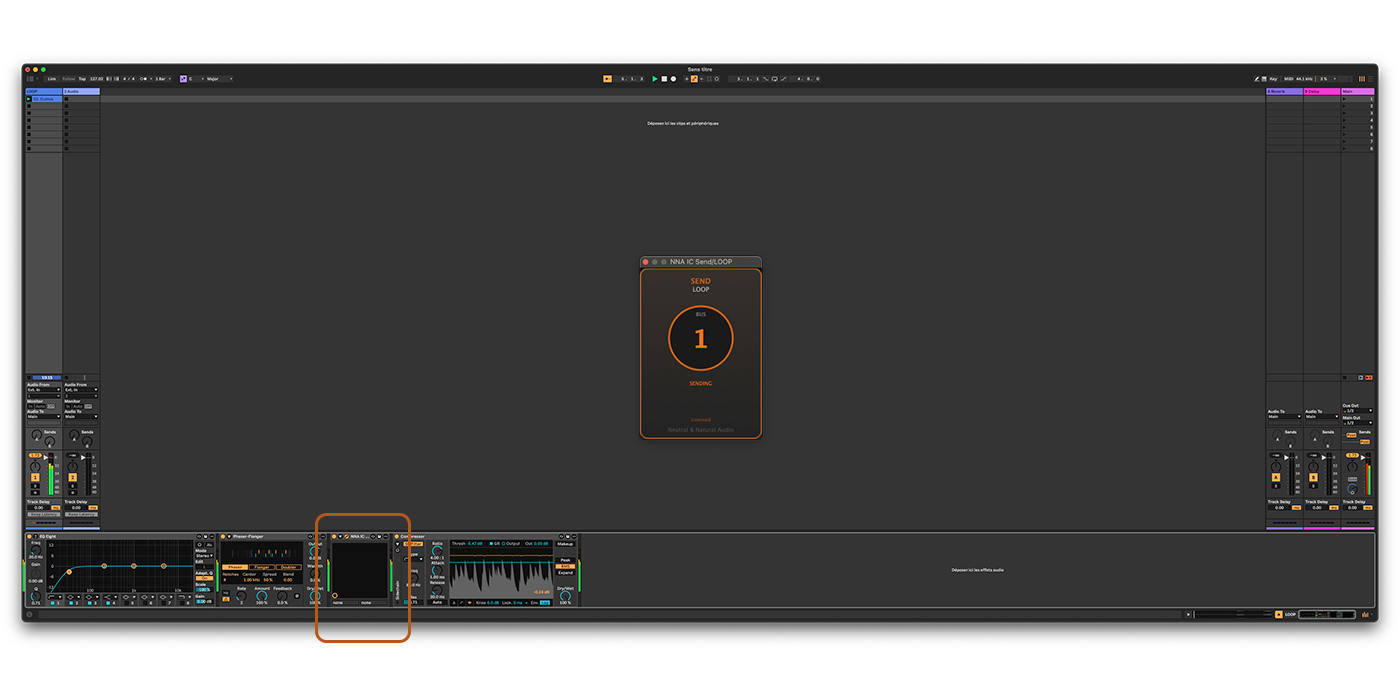
Tap the signal at any point of the effect chain and route it to any other track. AudioBridge is independent from the DAW's pre/post-fader send system.
Route audio from anywhere in your signal chain
DAW to DAW Routing
Send audio in real-time from any DAW to any DAW. No bouncing, no export.
Mix in Ableton, master in WaveLab. Use Logic's Space Designer or Sculpture in Cubase. Access the best of every DAW's exclusive plugins without leaving your main session.
To route audio between DAWs, both running on the same machine:
Insert the Send plugin on a track in the first DAW and pick a bus.
Insert the Return plugin in the second DAW on the same bus number.
Audio flows instantly, with latency compensated automatically (PDC).
Real-time audio routing from Ableton to FL Studio
Up to 8 Sends to a Single Return
Sum several sources into one Return for parallel processing or submixes.
Multiple Send instances feeding one Return
Route to Any of 16 Returns
Each Send routes to one of 16 Return buses. Organise routing by instrument, stem or purpose.
16 independent Return buses
Creative Feedback Loops
Build complex feedback paths for sound design, ambient textures, or experimental effects. Enable Feedback mode in the Return to unlock this feature: a brick-wall limiter and an automatic trim keep the loop from running away.
Chain effects across tracks or DAWs and create evolving, self-generating soundscapes impossible with traditional routing.
Create complex feedback paths for sound design
FAQ
General
AudioBridge is an audio routing plugin that lets you send audio between different tracks in your DAW, or even between different DAWs. Insert the Send and Return plugins anywhere in your effect chain to tap or receive audio at any point in your signal flow.
All DAWs supporting VST3, AU or CLAP on macOS: Ableton Live, Logic Pro, Cubase, Studio One, Reaper, Bitwig, FL Studio, and more. A Windows build is in progress.
1 buffer (samples depending on your DAW's buffer size). In Feedback mode, an additional buffer plus 1 ms for the limiter's look-ahead. The plugin automatically reports latency to the DAW for compensation (PDC).
Comparisons & Use Cases
Yes. Insert a Send plugin on your Ableton track, and a Return plugin on a Logic Pro track. The audio is routed in real-time with automatic latency compensation. This lets you use Logic-exclusive instruments like Alchemy or Space Designer directly in your Ableton session, and vice versa.
AudioBridge is a plugin-based alternative to virtual audio cables such as BlackHole, VB-Cable, Soundflower or our own free NNA Virtual Audio. Those operate at the system level and require manual configuration of audio drivers. AudioBridge works as a standard plugin inside your DAW, with automatic latency compensation (PDC), 16 independent buses, and no system-level setup required. Just insert, select a bus, and go.
Yes. Insert a Send plugin at any point in your effect chain to tap the signal, then route it to a Return on another track for parallel processing. Unlike your DAW's built-in aux sends, you can tap audio from any position in the chain, not just pre or post fader.
Yes. Enable Feedback mode (FEEDBACK) in the Return to create controlled feedback paths. The loop is protected: a brick-wall limiter at -1 dBFS, a DC blocker, and an automatic trim that lowers the loop 6 dB at a time if the level keeps rising. Switching the mode on caps the gain at -6 dB. You can chain effects across tracks or even across DAWs to build evolving textures and experimental soundscapes.
Installation
Run the installer and follow the instructions. Plugins are automatically installed in standard folders.
macOS:
VST3: /Library/Audio/Plug-Ins/VST3/
AU: /Library/Audio/Plug-Ins/Components/
CLAP: /Library/Audio/Plug-Ins/CLAP/
The plugins are listed as NNA AudioBridge Send and NNA AudioBridge Return, under the manufacturer Neutral & Natural Audio. Rescan your plugins in your DAW preferences. Make sure you're using a 64-bit DAW on macOS 11 or later.
Usage
Insert "NNA AudioBridge Send" on the source track
Insert "NNA AudioBridge Return" on the destination track
Select the same bus number on both plugins
Audio is routed instantly
16 independent Returns, each identified by a unique color. Each Return can receive up to 8 Sends.
Feedback mode lets you create feedback loops on the same track (Send and Return on the same channel): the Return mixes the received signal with its own track's input and re-injects it on the next block. A brick-wall limiter at -1 dBFS, a DC blocker and an automatic trim keep the loop under control, and the gain is capped at -6 dB when the mode is switched on.
Yes, up to 8 Sends can route to the same Return. Signals are automatically mixed and the Return displays a list of connected sources.
Yes. Audio can be routed from Ableton Live to Logic Pro, for example, as long as both DAWs run on the same machine.
License
Click the licence line at the bottom of the plugin ("Trial" or "EXPIRED"), enter your email and license key, then click "Activate". Once activated, the plugin works without an internet connection for thirty days at a time and renews itself whenever you are online; after thirty days offline it shows "Offline" and mutes until it reaches the server again.
One license allows you to use the plugin on 2 machines (e.g., studio + laptop).
After 14 days, the plugin stays in your session but its audio is muted. Purchase a license to reactivate. During the trial, the plugin works offline for its remaining days.
Yes, you can manage your activations directly from your customer panel. Deactivate a machine to free up a slot, then activate on your new device.
Technical
No, CPU impact is negligible.
Yes, the plugin automatically reports its latency to the DAW (PDC - Plugin Delay Compensation).
Try the full plugin free for 14 days, no credit card required. One licence covers two machines. AudioBridge is developed and supported directly by Jean-Pierre Baroni, acoustic designer. Questions before purchase: contact support.
AudioBridge routes audio inside and between DAWs. To route audio between any macOS applications at the system level, see NNA Virtual Audio (free). For calibrated monitoring and reference comparison on the Mac, see PHON.
€19
One-time purchase · Licence for 2 machines · Licence terms
A full-featured 14-day free trial is available before you buy. Prices include VAT. The licence key is delivered immediately; how that affects your right of withdrawal is set out in the
Terms of Sale
macOS 11 or laterApple Silicon & IntelVST3, AU & CLAP